Today, we’re announcing managed daemon support for Amazon Elastic Container Service (Amazon ECS) Managed Instances. This new capability extends the managed instances experience we introduced in September 2025, by giving platform engineers independent control over software agents such as monitoring, logging, and tracing tools, without requiring coordination with application development teams, while also improving reliability by ensuring every instance consistently runs required daemons and enabling comprehensive host-level monitoring.
When running containerized workloads at scale, platform engineers manage a wide range of responsibilities, from scaling and patching infrastructure to keeping applications running reliably and maintaining the operational agents that support those applications. Until now, many of these concerns were tightly coupled. Updating a monitoring agent meant coordinating with application teams, modifying task definitions, and redeploying entire applications, a significant operational burden when you’re managing hundreds or thousands of services.
Decoupled lifecycle management for daemons
Amazon ECS now introduces a dedicated managed daemons construct that enables platform teams to centrally manage operational tooling. This separation of concerns allows platform engineers to independently deploy and update monitoring, logging, and tracing agents to infrastructure, while enforcing consistent use of required tools across all instances, without requiring application teams to redeploy their services. Daemons are guaranteed to start before application tasks and drain last, ensuring that logging, tracing, and monitoring are always available when your application needs them.
Platform engineers can deploy managed daemons across multiple capacity providers, or target specific capacity providers, giving them flexibility in how they roll out agents across their infrastructure. Resource management is also centralized, allowing teams to define daemon CPU and memory parameters separately from application configurations with no need to rebuild AMIs or update task definitions, while optimizing resource utilization since each instance runs exactly one daemon copy shared across multiple application tasks.
Let’s try it out
To take ECS Managed Daemons for a spin, I decided to start with the Amazon CloudWatch Agent as my first managed daemon. I had previously set up an Amazon ECS cluster with a Managed Instance capacity provider using the documentation.
From the Amazon Elastic Container Service console, I noticed a new Daemon task definitions option in the navigation pane, where I can define my managed daemons.
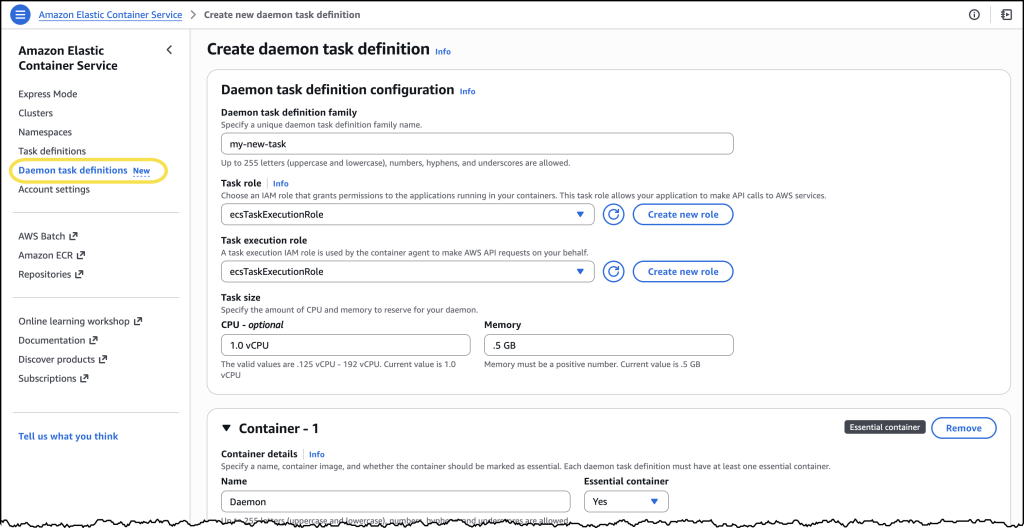
I chose Create new daemon task definition to get started. For this example, I configured the CloudWatch Agent with 1 vCPU and 0.5 GB of memory. In the Daemon task definition family field, I entered a name I’d recognize later.
For the Task execution role, I selected ecsTaskExecutionRole from the dropdown. Under the Container section, I gave my container a descriptive name and pasted in the image URI: public.ecr.aws/cloudwatch-agent/cloudwatch-agent:latest along with a few additional details.
After reviewing everything, I chose Create.
Once my daemon task definition was created, I navigated to the Clusters page, selected my previously created cluster and found the new Daemons tab.
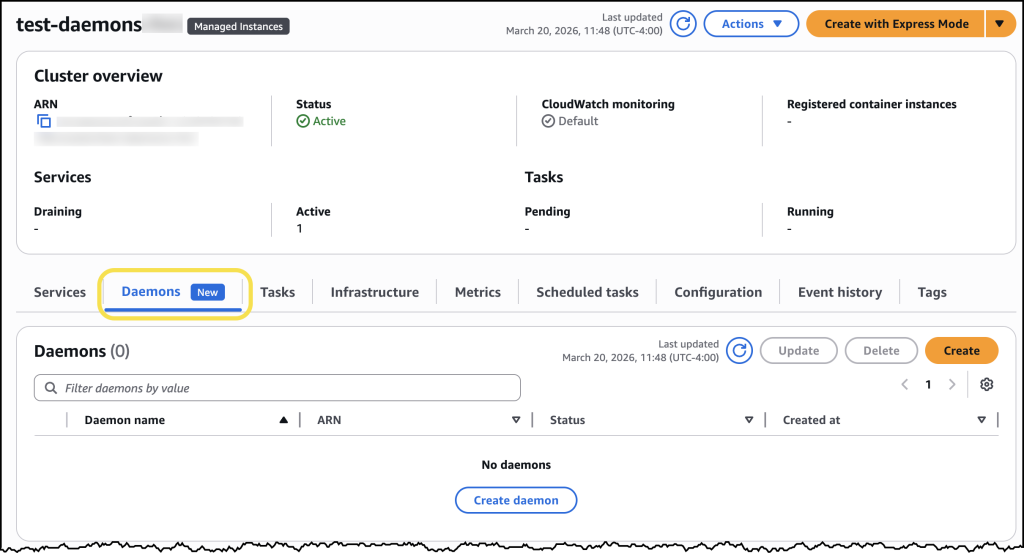
Here I can simply click the Create daemon button and complete the form to configure my daemon.
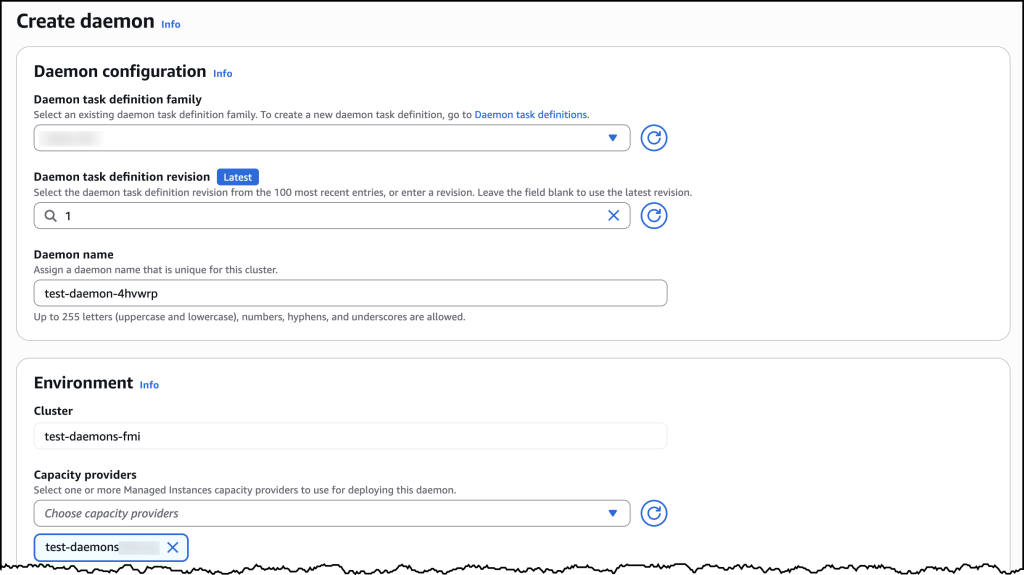
Under Daemon configuration, I selected my newly created daemon task definition family and then assigned my daemon a name. For Environment configuration, I selected the ECS Managed Instances capacity provider I had set up earlier. After confirming my settings, I chose Create.
Now ECS automatically ensures the daemon task launches first on every provisioned ECS managed instance in my selected capacity provider. To see this in action, I deployed a sample nginx web service as a test workload. Once my workload was deployed, I could see in the console that ECS Managed Daemons had automatically deployed the CloudWatch Agent daemon alongside my application, with no manual intervention required.
When I later updated my daemon, ECS handled the rolling deployment automatically by provisioning new instances with the updated daemon, starting the daemon first, then migrating application tasks to the new instances before terminating the old ones. This “start before stop” approach ensures continuous daemon coverage: your logging, monitoring, and tracing agents remain operational throughout the update with no gaps in data collection. The drain percentage I configured controlled the pace of this replacement, giving me complete control over addon updates without any application downtime.
How it works
The managed daemon experience introduces a new daemon task definition that is separate from task definitions, with its own parameters and validation scheme. A new daemon_bridge network mode enables daemons to communicate with application tasks while remaining isolated from application networking configurations.
Managed daemons support advanced host-level access capabilities that are essential for operational tooling. Platform engineers can configure daemon tasks as privileged containers, add additional Linux capabilities, and mount paths from the underlying host filesystem. These capabilities are particularly valuable for monitoring and security agents that require deep visibility into host-level metrics, processes, and system calls.
When a daemon is deployed, ECS launches exactly one daemon process per container instance before placing application tasks. This guarantees that operational tooling is in place before your application starts receiving traffic. ECS also supports rolling deployments with automatic rollbacks, so you can update agents with confidence.
Now available
Managed daemon support for Amazon ECS Managed Instances is available today in all AWS Regions. To get started, visit the Amazon ECS console or review the Amazon ECS documentation. You can also explore the new managed daemons Application Programming Interface (APIs) by visiting this website.
There is no additional cost to use managed daemons. You pay only for the standard compute resources consumed by your daemon tasks.