Poor database performance is never just a database problem. In enterprise teams, it shows up as missed service-level agreements (SLAs), delayed releases, frustrated development teams, and rising operational risk. The performance problem compounds further in business impact, often resulting in frustrated customers, retention and conversion risk, and lost revenue.
I have seen this repeatedly while working with enterprises building and running large‑scale data platforms, both as a customer and partner, and now with Microsoft. When teams are forced to jump between SQL editors, monitoring dashboards, cloud portals, and documentation just to diagnose a slow query, the real cost is not just technical. It’s also time, trust, and momentum lost across the business.
A more integrated way to run PostgreSQL on Azure
This is why I am optimistic about where PostgreSQL on Azure stands today. Microsoft’s investment in open source and PostgreSQL has matured significantly over the last several years. Azure Database for PostgreSQL has evolved into a fully managed, fully open-source enterprise-ready platform, Azure HorizonDB has entered the conversation as the next-gen Postgres on Azure delivering 3x faster performance than self-managed Postgres, and Microsoft is extending that value directly into the tools developers and database administrators (DBAs) already use. The PostgreSQL extension for Visual Studio Code is a clear example of that progress, especially with its new performance‑enhancing capabilities.
Most enterprise teams do not lack tooling. They lack integration. Performance work often breaks down because insights live in one place, actions live in another, and context is lost in between. Microsoft’s direction with the PostgreSQL extension for VS Code focuses on closing those gaps by bringing development, diagnostics, and tuning into a single workflow.
The extension is designed to help teams manage PostgreSQL across the full lifecycle, from authoring queries and exploring schemas to monitoring server health and optimizing performance. For organizations standardizing PostgreSQL on Azure, this creates a more coherent operating model that reduces friction between developers, DBAs, and platform teams.
Seeing performance clearly with the Server Metrics Dashboard
One of the most impactful additions is the server metrics dashboard. For DBAs and platform engineers, this dashboard brings key performance signals such as CPU, memory, storage, and connections directly into VS Code. Instead of switching contexts to investigate an issue, teams can view metrics where they already work.
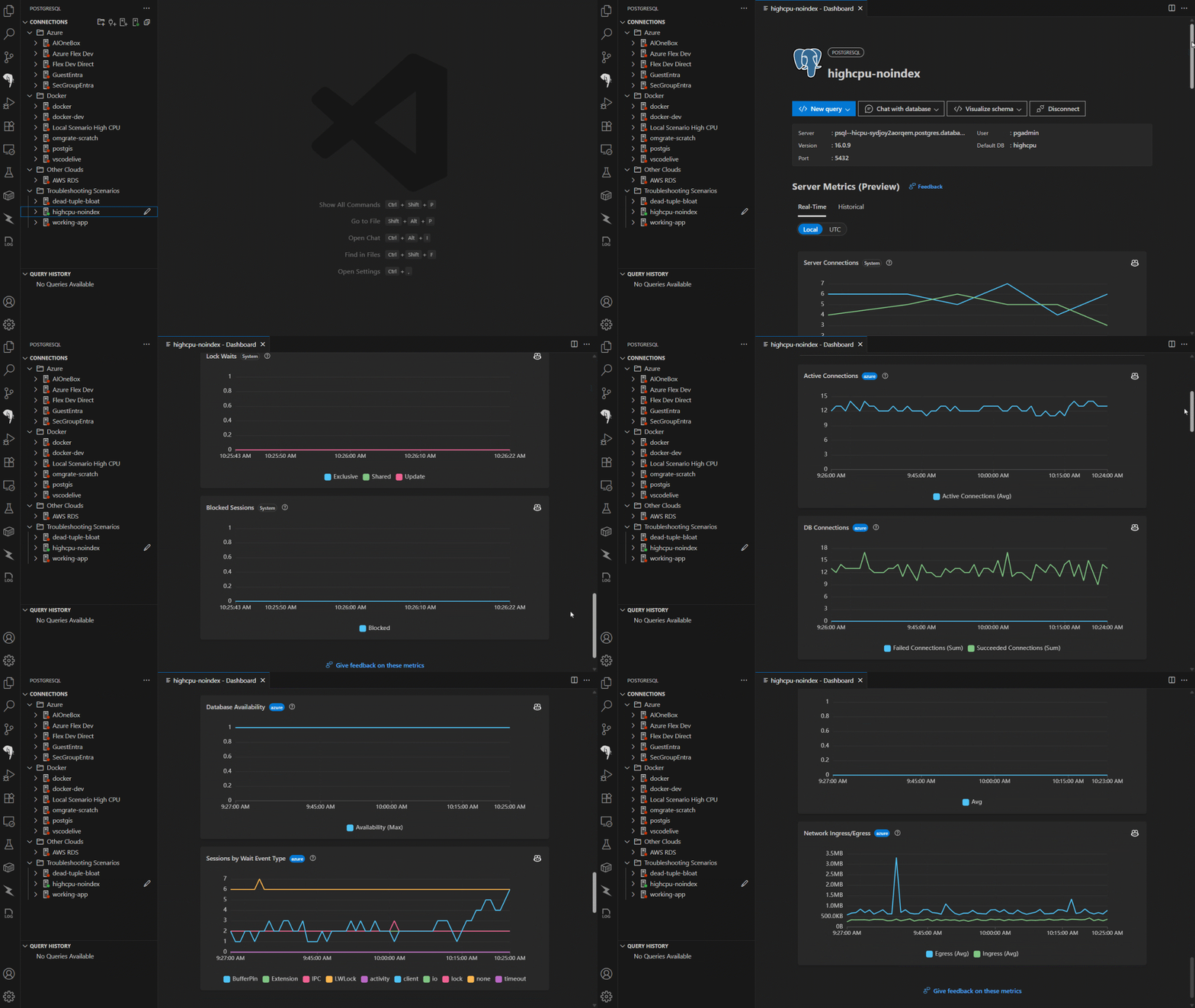
Because the dashboard is integrated with Azure, it provides Azure‑specific telemetry and historical insights that help teams understand trends, not just snapshots. When performance issues arise, the time from detection to investigation is significantly reduced.
From insight to action with Azure Advisor in VS Code
Observability only matters if it leads to action. The PostgreSQL extension surfaces Azure Advisor recommendations directly in the editor, connecting performance insights with concrete guidance. These recommendations can include suggestions around configuration, indexing, and resource optimization based on Azure telemetry.
For enterprise teams, this shortens the feedback loop. Instead of manually correlating metrics with best practices, teams receive contextual recommendations aligned to their actual workloads. This improves operational confidence and helps standardize tuning practices across environments.
Faster diagnosis with Query Plan visualization and AI assistance
Performance tuning often comes down to understanding query behavior. Recent improvements to the extension enhance query plan visualization, making execution plans easier to interpret during troubleshooting and optimization.
Beyond visualization, Microsoft is embedding AI‑assisted query analysis and optimization directly into the workflow. Developers and DBAs can analyze query plans, understand potential bottlenecks, and explore optimization options without leaving VS Code. This does not replace deep PostgreSQL expertise, but it helps teams move faster and make better decisions earlier in the development cycle.
These capabilities are especially valuable for enterprise environments where not every developer is a PostgreSQL specialist, yet performance expectations remain high.
Better authoring experiences reduce performance issues upstream
Performance work does not start in production. It starts when schemas are designed and queries are written. The PostgreSQL extension improves this experience with schema‑aware IntelliSense, search_path‑aware query authoring, and reliable object explorer behavior for large and complex databases.
Developers can write, run, and refine SQL with better context, while DBAs benefit from more consistent and predictable interactions with large schema estates. Improvements to object explorer reliability also matter at enterprise scale, where long‑running sessions and frequent refreshes are common.
Combined with Microsoft Entra ID authentication and integrated Azure resource discovery, the extension provides a secure and governed way to work with PostgreSQL across development and production environments.
From tuning to performance payout
Taken together, these capabilities change the day‑to‑day experience of running PostgreSQL on Azure. Azure Database for PostgreSQL already delivers the managed fundamentals enterprises expect, including high availability, security, and best‑practice guidance. The PostgreSQL extension for VS Code extends that value into execution by making performance management part of the same workflow as development.
This integration is a practical differentiator. It reflects an understanding of how enterprise teams actually work and where time is lost today. Instead of adding more tools, Azure is tightening the loop between insight and action.
A look ahead: AI‑native PostgreSQL with Azure HorizonDB
As enterprises look toward AI‑native architectures, Microsoft is also introducing Azure HorizonDB in public preview. Azure HorizonDB is designed for cloud‑native, AI‑ready PostgreSQL‑compatible workloads that require advanced scalability and integrated AI capabilities.
For most production workloads today, Azure Database for PostgreSQL remains the recommended choice. Azure HorizonDB represents an adjacent, forward‑looking option for teams exploring what comes next for their AI‑powered applications.
Turning performance into a competitive advantage
The real advantage of these new capabilities is the way they come together to reduce friction, improve clarity, and help teams act faster. For enterprises managing PostgreSQL at scale, that translates directly into better reliability, faster delivery, and lower operational risk.
If you are running PostgreSQL on Azure today, now is a good time to see what this looks like in practice. Try the PostgreSQL extension for VS Code and connect it to your Postgres databases on Azure to diagnose issues faster, optimize performance with greater confidence, and keep critical workloads running the way your business and your customers expect.
Try the PostgreSQL extension for VS Code
Diagnose issues faster and optimize performance with confidence

The post The performance dividend: Optimizing PostgreSQL on Azure directly in Visual Studio Code appeared first on Microsoft Azure Blog.